Showing posts with label Miscellaneous. Show all posts
Showing posts with label Miscellaneous. Show all posts
2018/04/24
How to insert Company or Contact details in a quote or invoice from Simple CRM?
The insertion of Company or Contact details, in a quote or invoice, is made possible from Simple CRM, thanks to the "clipboard" icon.

Internal chat sound notification is too low
From Windows 7, the volume can be adjusted either globally or window by window.
If the chat sound notification is too low, you should not only increase the overall volume but also increase the volume of the internal chat window Simple CRM.
For that:
open the Simple CRM internal chat (left menu -> Internal Chat)
Open the Windows volume control (click the Volume icon on the taskbar), then click "Mixer".

identify the internal chat window and increase the volume of this window

close the volume mixer
If the chat sound notification is too low, you should not only increase the overall volume but also increase the volume of the internal chat window Simple CRM.
For that:
open the Simple CRM internal chat (left menu -> Internal Chat)
Open the Windows volume control (click the Volume icon on the taskbar), then click "Mixer".
identify the internal chat window and increase the volume of this window

close the volume mixer
2018/04/23
It's strange, Interactions are no longer sorted by date! What's going on? What's going on?
You simply clicked on a column header and since the column headers are reactive and Simple CRM stores your sorting choices to suit the way you work, the view has been modified.
To change this, simply click DATE.
To know which column header is the sort header, it is necessary to locate the purple tilled dots present under the header of choice of sorting.

What is the purpose of the QR Code generator present in the application launcher?
QR Codes are a great opportunity to link a mobile phone to online content.
Here are some examples of practical applications: https://www.1min30.com/social-media-marketing/10-exemples-dutilisation-de-qr-codes-cross-canaux-16559
Another application example: if you print paper documents, create a QR Code based on the URL (web address of the page) of the company or contact person or a project.
Thus, you can scan the QR Code with your mobile phone and directly arrive on the company or contact page, the complete project schedule, with your phone; ideal for creating a physical link between paper files and Simple CRM.


Here are some examples of practical applications: https://www.1min30.com/social-media-marketing/10-exemples-dutilisation-de-qr-codes-cross-canaux-16559
Another application example: if you print paper documents, create a QR Code based on the URL (web address of the page) of the company or contact person or a project.
Thus, you can scan the QR Code with your mobile phone and directly arrive on the company or contact page, the complete project schedule, with your phone; ideal for creating a physical link between paper files and Simple CRM.


2018/04/15
How to manage the use of a vehicle, a meeting room or for example the rooms of a hotel?
To do this, you must ask your internal Simple CRM manager to go to Administration -> Usage List -> Add Resource
A resource is therefore a work resource: a vehicle, a meeting room, a room you rent, a hotel room, etc.
You can then allocate this resource via an Interaction.
For example, if Mr Dupont rents room 404, you create an Interaction, linked to Mr Dupont and the user "Room 404".
So in the rental schedule of the room you see this rental.
Same for a vehicle, etc.
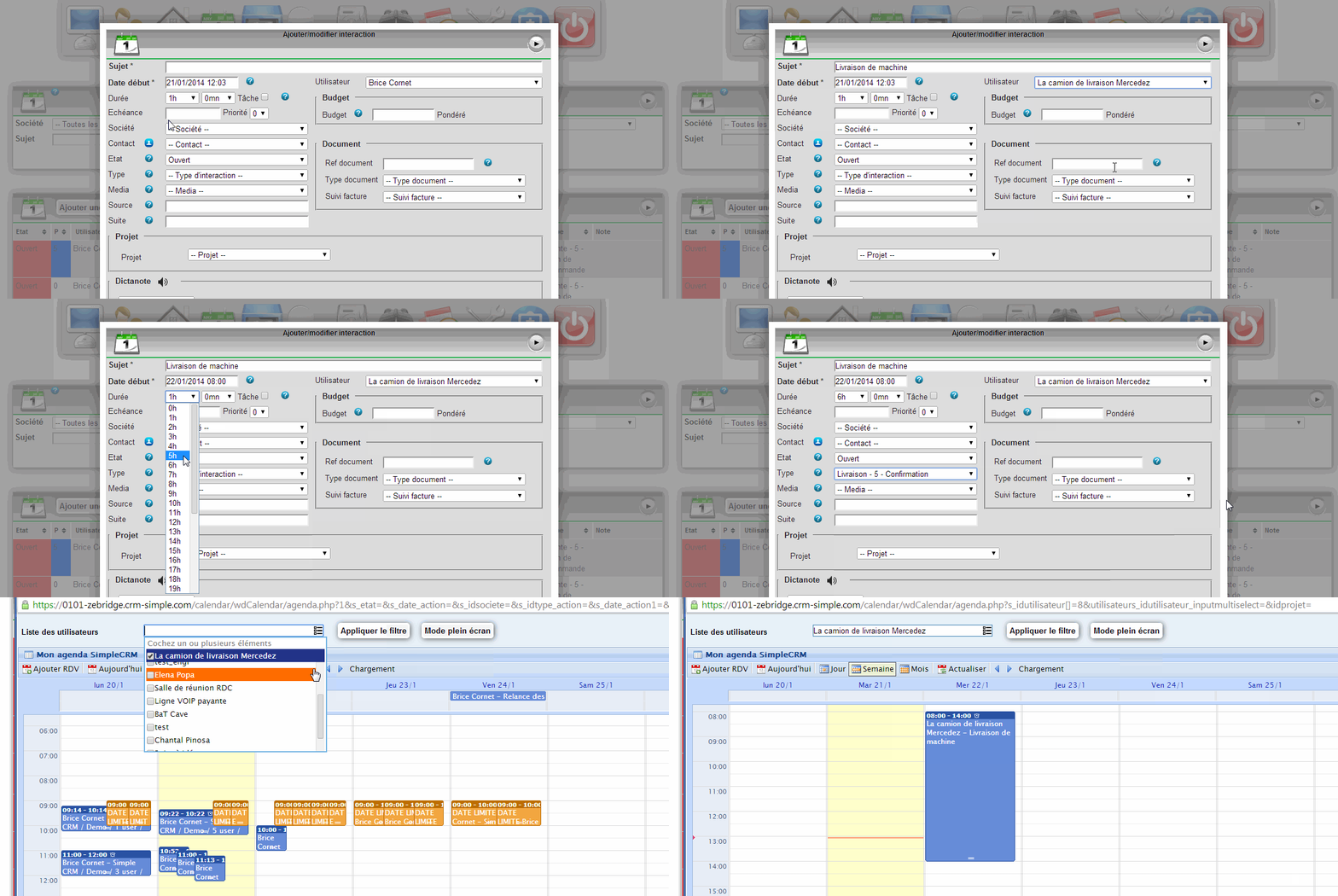
A resource is therefore a work resource: a vehicle, a meeting room, a room you rent, a hotel room, etc.
You can then allocate this resource via an Interaction.
For example, if Mr Dupont rents room 404, you create an Interaction, linked to Mr Dupont and the user "Room 404".
So in the rental schedule of the room you see this rental.
Same for a vehicle, etc.
What is the purpose of the QR Code generator present in the application launcher?
QR Codes are a great opportunity to link a mobile phone to online content.
Here are some examples of practical applications: https://www.1min30.com/social-media-marketing/10-exemples-dutilisation-de-qr-codes-cross-canaux-16559
Another application example: if you print paper documents, create a QR Code based on the URL (web address of the page) of the company or contact person or a project.
Thus, you can scan the QR Code with your mobile phone and directly arrive on the company or contact page, the complete project schedule, with your phone; ideal for creating a physical link between paper files and Simple CRM.

Here are some examples of practical applications: https://www.1min30.com/social-media-marketing/10-exemples-dutilisation-de-qr-codes-cross-canaux-16559
Another application example: if you print paper documents, create a QR Code based on the URL (web address of the page) of the company or contact person or a project.
Thus, you can scan the QR Code with your mobile phone and directly arrive on the company or contact page, the complete project schedule, with your phone; ideal for creating a physical link between paper files and Simple CRM.

2018/04/08
How do I make a Skype call from Simple CRM?
Simple CRM chats directly with Skype.
To make a Skype call, just click the Skype button.
To make a Skype call, just click the Skype button.
2018/04/07
I have an error message in Interaction that tells me about Chrome. What's going on? What's going on?
This message simply informs you that voice recognition only works under Chrome.
More info here:
http://comment-utiliser-simple-crm.blogspot.fr/2014/01/comment-fonctionne-la-reconnaissance.html
More info here:
http://comment-utiliser-simple-crm.blogspot.fr/2014/01/comment-fonctionne-la-reconnaissance.html
Subscribe to:
Posts (Atom)